HTTP protocol explained: The Complete Practical Guide for Developers
A practical guide to HTTP. No fluff — just what you need to build better applications and debug faster.
Table of Contents
- What is HTTP?
- Why HTTP Matters
- HTTP Versions
- HTTP Messages
- HTTP Headers
- HTTP Methods
- Status Codes
- Idempotency
- CORS
- Caching
- Content Negotiation
- Compression
- Persistent Connections
- Streaming
- HTTPS
What is HTTP?
HTTP (HyperText Transfer Protocol) is the fundamental language that powers the entire web. Think of it as the universal translator that allows your browser, mobile apps, and backend services to communicate with servers across the internet. Every time you load a website, check your email, or scroll through social media, HTTP is working behind the scenes, shuttling data back and forth in a structured, predictable way.
At its core, HTTP operates on a beautifully simple principle: one device asks for something (the client), and another device responds with that thing (the server). This request-response model is what makes the web work. When you type a URL into your browser or your app fetches data from an API, that's an HTTP request flying across the network. The server processes that request and sends back an HTTP response containing the data you asked for—or an error message if something went wrong.
Here's what a basic interaction looks like:
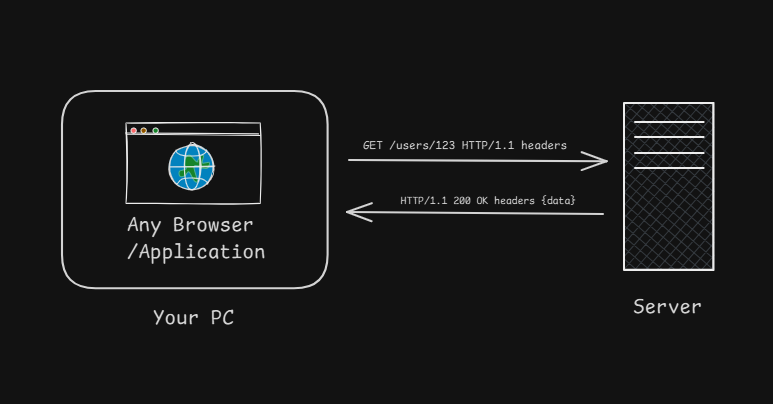
Your Browser  →  "GET /users/123 HTTP/1.1 headers..."  →  Server
Your Browser  ←  "HTTP/1.1 200 OK headers... {data}"   ←  Server
The beauty of HTTP is that it's text-based (in HTTP/1.x), which means humans can actually read and understand what's being sent. This makes debugging infinitely easier compared to binary protocols where you're staring at gibberish. You can literally open your browser's developer tools right now, go to the Network tab, and watch HTTP messages flying back and forth in real-time. Try it—it's oddly satisfying.
Understanding Statelessness
Now here's where HTTP gets interesting: it's stateless, meaning the server has zero memory of previous requests. Each request is treated as a completely fresh interaction, as if the server has never met you before. This might sound like a limitation at first—and honestly, it can be frustrating when you're starting out—but it's actually one of HTTP's greatest strengths.
Why? Because statelessness makes scaling trivial. If every request is independent, any server in a cluster can handle any request. You don't need "sticky sessions" or complex state synchronization between servers. User sends Request A to Server 1? Cool. Request B goes to Server 2? Also fine. The servers don't need to coordinate because there's no state to keep track of.
Let's see this in action:
Request 1: GET /cart HTTP/1.1
Response: "What cart? And first of all, who are you?"

Request 2: GET /cart HTTP/1.1
Response: "Still don't know you. Who dis?"So how do websites "remember" you? They cheat. We add state back using cookies or tokens. The server gives you a unique identifier (like a session ID), and you send it with every request:
GET /cart HTTP/1.1
Cookie: session_id=abc123

Response: "Ah yes, session abc123! Here's your cart with 3 items."The server looks up your session ID in a database (like Redis) and retrieves your cart data. Boom—stateful behavior built on a stateless protocol. It's like showing your ID card every time you enter a building instead of the security guard remembering your face.
The Request-Response Contract
HTTP follows a strict contract: the client always initiates, the server always responds. The server never sends unsolicited data (that's what WebSockets are for). This asymmetry keeps things simple and predictable. Every HTTP conversation follows the same dance:
- Client opens connection (usually TCP on port 80 or 443)
- Client sends request ("I want this resource")
- Server processes request (database queries, business logic, etc.)
- Server sends response ("Here's what you asked for" or "Nope, can't do that")
- Connection closes (or stays open for more requests)
This predictable pattern is why HTTP is so reliable. There's no ambiguity about who's talking when, no complex state machines to debug. Request comes in, response goes out. Simple. Elegant. Effective.
Why HTTP Matters
Imagine trying to build the internet without a standard protocol. Every website would invent its own communication rules, every API would require a custom client, and developers would spend more time writing protocol adapters than building actual features. It would be absolute chaos—like trying to have a conversation where everyone speaks a different language with no translators available.
HTTP solved this problem by giving us a universal standard. Whether you're talking to GitHub's API, Stripe's payment system, or your own backend, the protocol is identical. Same request format, same response structure, same status codes, same headers. This standardization is so fundamental to the web that we take it for granted, but it's genuinely revolutionary. One fetch() call works for thousands of different services:
// Same exact pattern, completely different services
fetch('https://api.github.com/users/octocat')
fetch('https://api.stripe.com/v1/charges')
fetch('https://yourcompany.com/api/orders')No special configuration, no custom libraries, no protocol negotiation—just HTTP. This is the magic of standardization.
The Hidden Benefits You Get for Free
When you use HTTP, you're not just getting a protocol—you're getting an entire ecosystem that has evolved over 30+ years. Built-in caching means browsers and CDNs automatically cache your responses if you set the right headers. You don't need to build a caching layer; it's already there, waiting for you to use it:
Cache-Control: public, max-age=3600That single header tells every intermediary between your server and the user to cache this response for an hour. Millions of requests saved, zero extra code written. That's leverage.
Then there's the tooling ecosystem. Because HTTP is standardized, we have incredible tools that work with any HTTP service: browser DevTools show you every request with full headers and timing information, Postman lets you craft complex API requests with a GUI, cURL gives you command-line superpowers, and monitoring tools like DataDog can analyze HTTP traffic patterns across your entire infrastructure. All of this exists because HTTP is standardized.
Statelessness: The Scalability Superpower
Here's where HTTP's stateless design becomes a massive advantage. In the old days, servers used to maintain session state in memory. This worked fine for small applications, but it created a nightmare for scaling. If Server A knew about your session but Server B didn't, load balancers had to implement "sticky sessions" to route all your requests to Server A. This meant uneven load distribution, difficult failover, and complex infrastructure.
HTTP's statelessness cuts through this complexity like a hot knife through butter. Because each request is independent, any server can handle any request. Your first request goes to Server 1 in California? Cool. Your next request goes to Server 2 in Virginia? Also fine. Neither server needs to know about the other, and both can process your request by looking up your session token in a shared database.
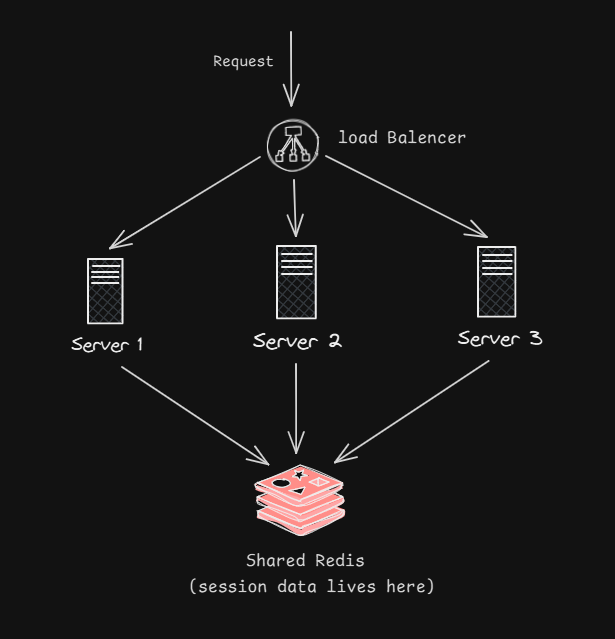
This architecture is simple, reliable, and scales horizontally. Need more capacity? Spin up more servers. No complex state synchronization, no session migration, no headaches. This is why modern web applications can serve millions of users—HTTP's stateless design makes it almost trivially easy to scale.
When you combine all these benefits—universal compatibility, free caching, incredible tooling, and effortless scaling—you start to understand why HTTP has dominated the web for three decades and shows no signs of going away. It's not just a protocol; it's the foundation that makes the entire internet economy possible.
HTTP Versions: Evolution Through Real Problems
What an actual http request/response look like?
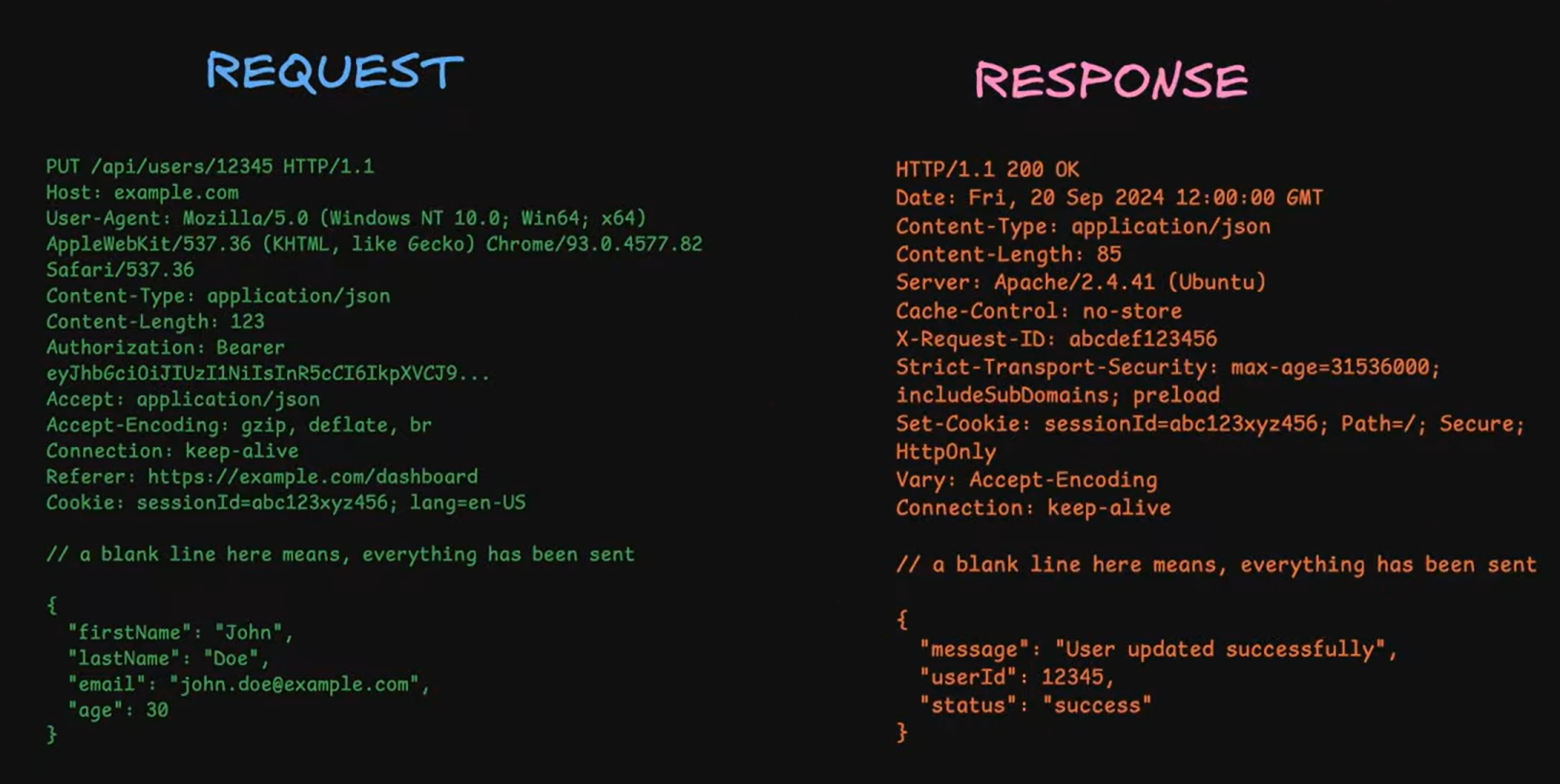
HTTP has evolved through three major versions, each solving critical performance bottlenecks that became apparent as the web grew. Understanding this evolution isn't just history—it's understanding the performance characteristics and limitations of the systems you're building today.
HTTP/1.1 (1997) - The Foundation
HTTP/1.1 was the protocol that took the web mainstream. It introduced persistent connections (keep-alive), which meant you could send multiple requests over a single TCP connection instead of opening a new connection for every request. This was huge—establishing a TCP connection involves a three-way handshake that takes at least one round-trip time, and with the old HTTP/1.0 model, a page with 50 resources meant 50 TCP handshakes. That's a lot of wasted time and bandwidth.
With persistent connections, you connect once and reuse that connection:
TCP 3 way handshake
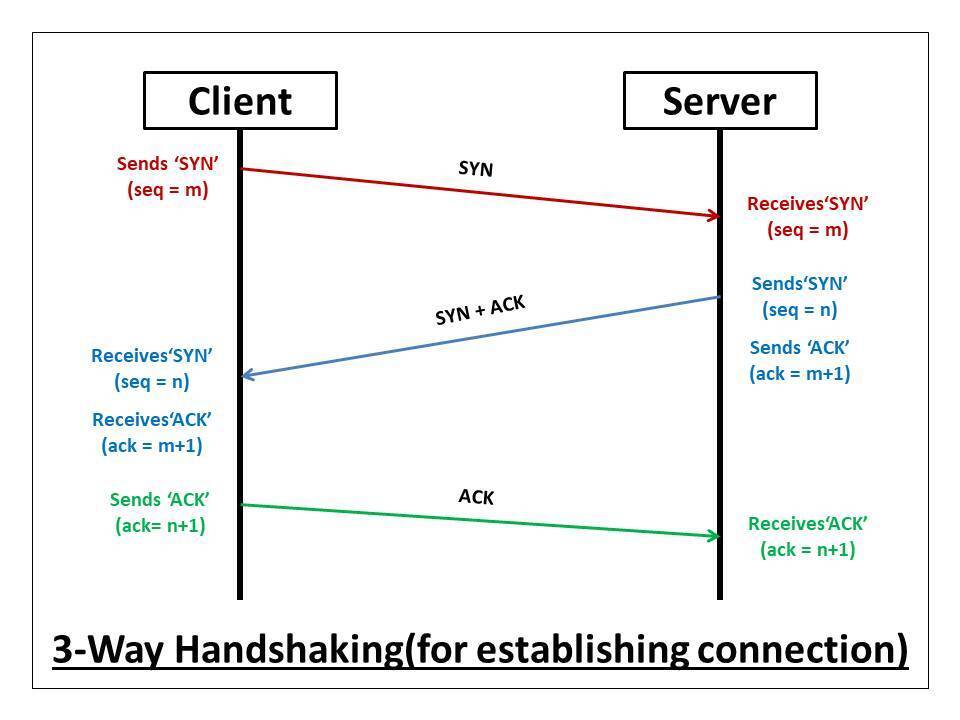
Connect (TCP handshake: 50-100ms)
Request 1 → Response 1
Request 2 → Response 2
Request 3 → Response 3
[... many more requests ...]
Disconnect
HTTP/1.1 also gave us chunked transfer encoding, which lets servers start sending data before they know the total size. This is critical for streaming use cases—imagine trying to stream a video if you had to buffer the entire file first to calculate Content-Length. Chunked encoding solved this by letting the server send data in pieces with each piece prefixed by its size.
But HTTP/1.1 had a fatal flaw: head-of-line blocking. Requests were still processed sequentially over each connection. Even though you had persistent connections, you couldn't truly parallelize requests. If Request 1 took 5 seconds, Request 2 had to wait those full 5 seconds before it could even start. Browsers worked around this by opening multiple connections (typically 6 per domain), but this was a hack, not a solution.
HTTP/2 (2015) - The Performance Revolution
HTTP/2 fundamentally changed how data flows over a connection with multiplexing—the ability to send multiple requests and receive multiple responses simultaneously over a single connection. Instead of requests waiting in line, they all fly at once:
┌──────────────────────────────────┐
│   Single TCP Connection          │
├──────────────────────────────────┤
│ Stream 1: GET /style.css     ───▶│
│ Stream 2: GET /script.js     ───▶│
│ Stream 3: GET /image.png     ───▶│
│ Stream 1: 200 OK [CSS data]  ◀───│
│ Stream 3: 200 OK [IMG data]  ◀───│ (came back first!)
│ Stream 2: 200 OK [JS data]   ◀───│
└──────────────────────────────────┘
Notice how responses can come back out of order—Stream 3 finishes before Stream 2, and that's fine. No more head-of-line blocking at the HTTP layer. This change alone typically improves page load times by 30-50%.
HTTP/2 also introduced header compression using HPACK. HTTP/1.1 sent the same headers repeatedly with every request, wasting kilobytes:
GET /api/users/1 HTTP/1.1
Host: api.example.com
User-Agent: Mozilla/5.0 (Macintosh; Intel Mac OS X 10_15_7) AppleWebKit/537.36...
Authorization: Bearer eyJhbGciOiJIUzI1NiIsInR5cCI6IkpXVCJ9...
Accept: application/json
Cookie: session=abc123; prefs=dark_mode; ...

GET /api/users/2 HTTP/1.1
Host: api.example.com
User-Agent: Mozilla/5.0 (Macintosh; Intel Mac OS X 10_15_7) AppleWebKit/537.36...
[... exact same headers repeated ...]HTTP/2 compresses these headers and remembers them across requests, so subsequent requests only send the differences. This saves significant bandwidth, especially for APIs where you make many requests with identical headers.
The catch: HTTP/2 still runs over TCP, and TCP has its own head-of-line blocking at the packet level. If a single TCP packet is lost, everything behind it stalls while that packet is retransmitted—even unrelated streams. This is especially painful on mobile networks with packet loss.
HTTP/3 (2022) - Breaking Free from TCP
HTTP/3 made the radical decision to abandon TCP entirely and use QUIC over UDP instead. This sounds crazy—UDP is the "unreliable" protocol, right? But QUIC implements reliability features on top of UDP while fixing TCP's fundamental limitations.
The key innovation is per-stream head-of-line blocking. In HTTP/2, a lost packet blocks all streams. In HTTP/3, a lost packet only blocks the stream it belongs to:
Stream 1: [Packet 1] [LOST!] [Packet 3] → Stalls waiting for Packet 2
Stream 2: [Packet 1] [Packet 2] [Packet 3] → Keeps flowing!
Stream 3: [Packet 1] [Packet 2] → Keeps flowing!
This is massive for mobile users. On spotty connections with 5% packet loss, HTTP/3 can be dramatically faster than HTTP/2 because lost packets don't stall unrelated requests.
HTTP/3 also has built-in encryption with TLS 1.3 integrated into QUIC. There's no separate TLS handshake—it's all one negotiation. Even better, HTTP/3 supports 0-RTT resumption, meaning if you've connected before, your first request can include data immediately without waiting for handshakes. This is perfect for mobile apps that frequently reconnect.
Finally, HTTP/3 has connection migration. When your phone switches from WiFi to cellular, TCP connections die and need to be reestablished. QUIC connections use connection IDs instead of IP addresses, so the connection seamlessly migrates to the new network. Your video keeps streaming, your API calls keep flowing—no interruption.
Current reality: HTTP/3 is used by Google (all properties), Facebook, Cloudflare, and other major services. Browser support is universal. But server adoption is still growing because it requires new infrastructure. Most applications still run on HTTP/1.1 or HTTP/2, and that's fine—they work well. HTTP/3 is an optimization, not a requirement.
What This Means for You
Here's the practical takeaway: you usually don't choose the HTTP version—your hosting provider, CDN, or load balancer handles it. Your application code doesn't change between versions. The same Express/Flask/Spring Boot code works with all versions.
What matters is understanding that:
- HTTP/1.1 is sequential (slow with many requests)
- HTTP/2 is parallel (fast with many requests)
- HTTP/3 is resilient (fast even on bad networks)
When debugging performance issues, check which version is being used. If you're on HTTP/1.1 and making 100 requests to load a page, upgrading to HTTP/2 might be your biggest performance win. If your mobile users complain about slow connections, HTTP/3 might help. But if you're making 5 API calls and they're already fast, the version doesn't matter much.
HTTP Messages
Every HTTP interaction uses this format:
┌──────────────┐
│ Start Line   │ ← Method + Path or Status
├──────────────┤
│ Headers      │ ← Metadata
│ Header: value│
├──────────────┤
│ (blank line) │ ← Required separator
├──────────────┤
│ Body         │ ← Optional data
└──────────────┘
Request Example
POST /api/users HTTP/1.1
Host: api.example.com
Content-Type: application/json
Content-Length: 27

{"name":"Alice","age":30}Parts:
- Request line:
POST /api/users HTTP/1.1 - Headers: Host, Content-Type, Content-Length
- Blank line: Required!
- Body: JSON data
Response Example
HTTP/1.1 201 Created
Content-Type: application/json
Location: /api/users/123

{"id":123,"name":"Alice"}Parts:
- Status line:
HTTP/1.1 201 Created - Headers: Content-Type, Location
- Blank line
- Body: Created resource
HTTP Headers
Headers are key-value pairs that provide metadata.
Critical Request Headers
Host (required)
Host: api.example.comWhich server to route to
Authorization
Authorization: Bearer eyJhbGc...Authentication credentials
Content-Type
Content-Type: application/jsonFormat of request body
Accept
Accept: application/jsonWhat response formats you'll accept
Cookie
Cookie: session_id=abc123Send stored cookies
Critical Response Headers
Content-Type
Content-Type: application/jsonFormat of response body
Set-Cookie
Set-Cookie: session_id=abc123; HttpOnly; SecureStore cookie on client
Cache-Control
Cache-Control: public, max-age=3600Caching instructions
Location
Location: /api/users/123Redirect or created resource URL
Security Headers (Must-Have)
Strict-Transport-Security
Strict-Transport-Security: max-age=31536000Force HTTPS
Content-Security-Policy
Content-Security-Policy: default-src 'self'Prevent XSS attacks
X-Content-Type-Options
X-Content-Type-Options: nosniffPrevent MIME sniffing
X-Frame-Options
X-Frame-Options: DENYPrevent clickjacking
Cookie Attributes (Security)
Set-Cookie: session=abc; HttpOnly; Secure; SameSite=Strict- HttpOnly: JavaScript can't access (prevents XSS)
- Secure: HTTPS only (prevents MITM)
- SameSite=Strict: Blocks CSRF attacks
HTTP Headers — Reference Table
Headers provide metadata and control behavior.
| Header | Explanation | Common Values | Usage |
|---|---|---|---|
| Host | Target server | api.example.com | Routing |
| Authorization | Credentials | Bearer <token>, Basic <base64> | Authentication |
| Content-Type | Body format | application/json, text/html, multipart/form-data | Parsing |
| Accept | Desired response | application/json, text/html, */* | Content negotiation |
| Accept-Language | Preferred language | en-US, fr-FR, hi-IN | Localization |
| User-Agent | Client info | Browser, curl, Postman | Analytics, debugging |
| Cookie | Client state | session_id=abc123 | Sessions |
| Set-Cookie | Store cookie | HttpOnly; Secure; SameSite=Strict | Authentication |
| Cache-Control | Caching | no-cache, max-age=3600, public | Performance |
| Location | Redirect or new resource | /api/users/123 | Navigation |
| Strict-Transport-Security | Force HTTPS | max-age=31536000 | Security |
| Content-Security-Policy | Prevent XSS | default-src 'self' | Security |
| X-Content-Type-Options | Prevent MIME sniffing | nosniff | Security |
| X-Frame-Options | Clickjacking protection | DENY, SAMEORIGIN | Security |
| Transfer-Encoding | Body transfer | chunked, gzip | Streaming/Compression |
| Connection | Connection persistence | keep-alive, close | Performance |
| Access-Control-Allow-Origin | CORS origin | *, https://example.com | Cross-origin requests |
| Access-Control-Allow-Methods | Allowed HTTP methods | GET, POST, PUT, DELETE, OPTIONS | CORS control |
| Access-Control-Allow-Headers | Allowed headers in CORS | Authorization, Content-Type | CORS control |
HTTP Methods
| Method | Purpose | Safe | Idempotent | Body |
|---|---|---|---|---|
| GET | Retrieve resource | ✅ | ✅ | ❌ |
| POST | Create resource | ❌ | ❌ | ✅ |
| PUT | Replace resource | ❌ | ✅ | ✅ |
| PATCH | Update resource | ❌ | ⚠️ | ✅ |
| DELETE | Remove resource | ❌ | ✅ | ❌ |
| OPTIONS | Check capabilities | ✅ | ✅ | ❌ |
Status Codes
### you are not supposed to remember all.
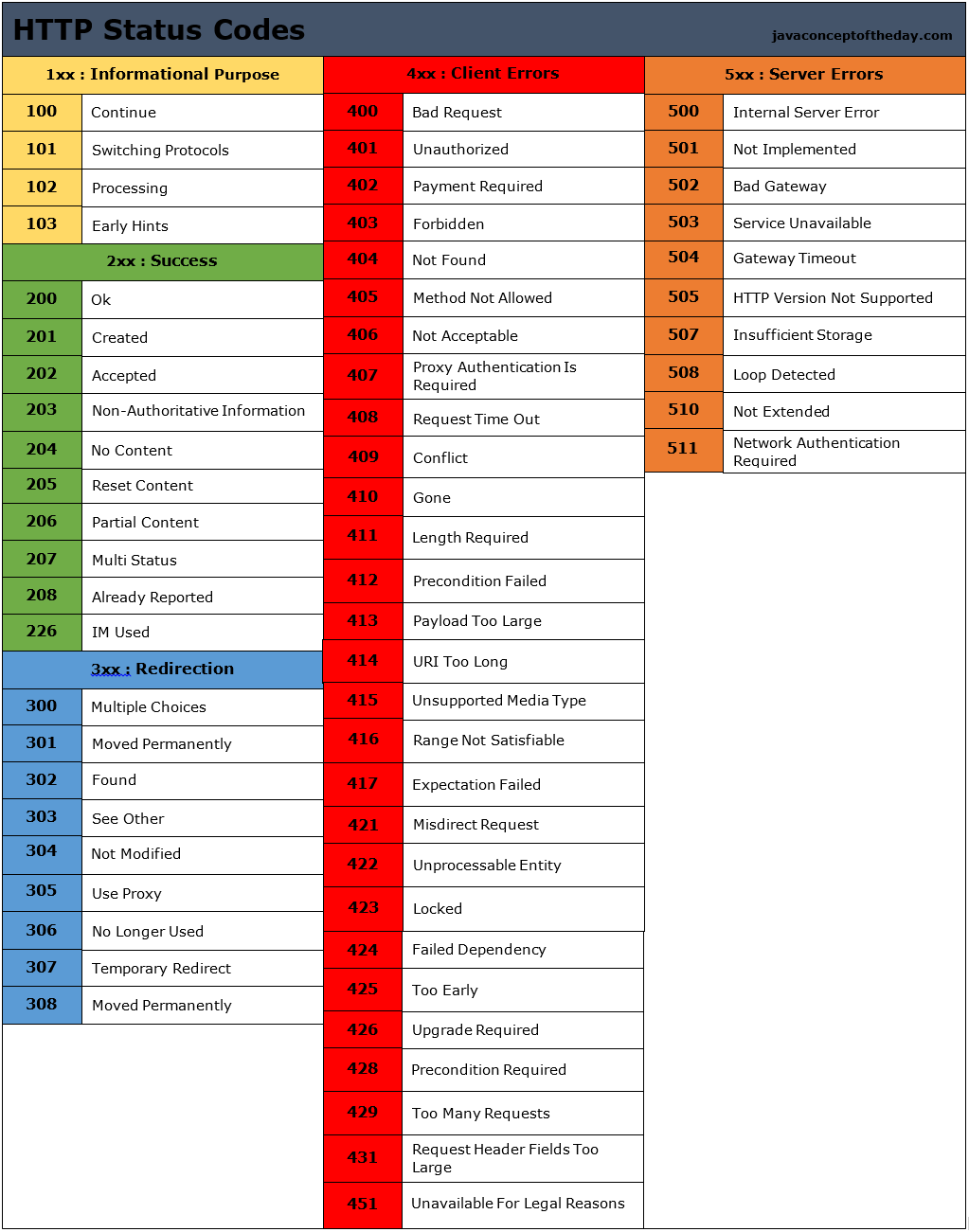
Mostly used Codes.
| Code | Meaning | When to Use |
|---|---|---|
| 200 | OK | Standard success |
| 201 | Created | Resource created |
| 204 | No Content | Success without body |
| 301 | Moved Permanently | Permanent redirect |
| 304 | Not Modified | Use cached resource |
| 400 | Bad Request | Invalid input |
| 401 | Unauthorized | Auth required |
| 403 | Forbidden | No permission |
| 404 | Not Found | Resource missing |
| 429 | Too Many Requests | Rate limited |
| 500 | Internal Server Error | Server issue |
| 502 | Bad Gateway | Upstream issue |
| 503 | Service Unavailable | Temporary downtime |
CORS
CORS (Cross-Origin Resource Sharing): Browser security that blocks cross-origin requests by default.
The Problem
// You're on https://frontend.com
fetch('https://api.backend.com/data')
// ❌ Blocked by browser!The Solution
Server sends CORS headers:
Access-Control-Allow-Origin: https://frontend.com
Access-Control-Allow-Methods: GET, POST
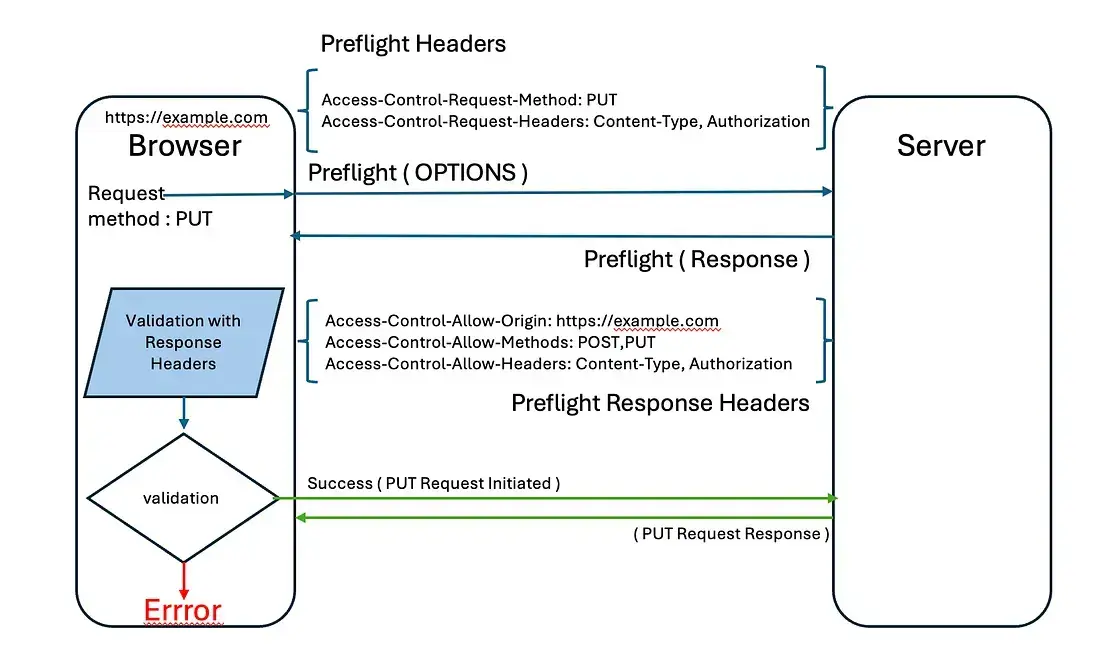
Access-Control-Allow-Headers: Content-TypeSimple vs Preflight Requests
Simple request (no preflight):
GET /api/data
Origin: https://frontend.com

Response:
Access-Control-Allow-Origin: https://frontend.comPreflight request (checks first):
OPTIONS /api/data
Origin: https://frontend.com
Access-Control-Request-Method: POST
Access-Control-Request-Headers: Content-Type

Response:
Access-Control-Allow-Origin: https://frontend.com
Access-Control-Allow-Methods: POST
Access-Control-Allow-Headers: Content-Type
Access-Control-Max-Age: 86400

Then actual POST request proceeds...Triggers preflight:
- Methods: PUT, DELETE, PATCH
- Custom headers
- Content-Type: application/json
Common CORS Setup
// Node.js/Express
app.use((req, res, next) => {
  res.header('Access-Control-Allow-Origin', 'https://frontend.com');
  res.header('Access-Control-Allow-Methods', 'GET,POST,PUT,DELETE');
  res.header('Access-Control-Allow-Headers', 'Content-Type,Authorization');
  res.header('Access-Control-Allow-Credentials', 'true');

  if (req.method === 'OPTIONS') {
    return res.sendStatus(200);
  }
  next();
});Caching
Caching saves bandwidth and improves speed.
Cache-Control Header
Don't cache (sensitive data):
Cache-Control: private, no-storeCache for 1 hour:
Cache-Control: public, max-age=3600Cache but revalidate:
Cache-Control: public, max-age=0, must-revalidateCache forever (static assets):
Cache-Control: public, max-age=31536000, immutableETag (Smart Caching)
First request:
GET /api/users/123

200 OK
ETag: "abc123"
{"id":123,"name":"Alice"}Later request:
GET /api/users/123
If-None-Match: "abc123"

304 Not Modified
(no body - use cache)If data changed:
200 OK
ETag: "xyz789"
{"id":123,"name":"Alice Updated"}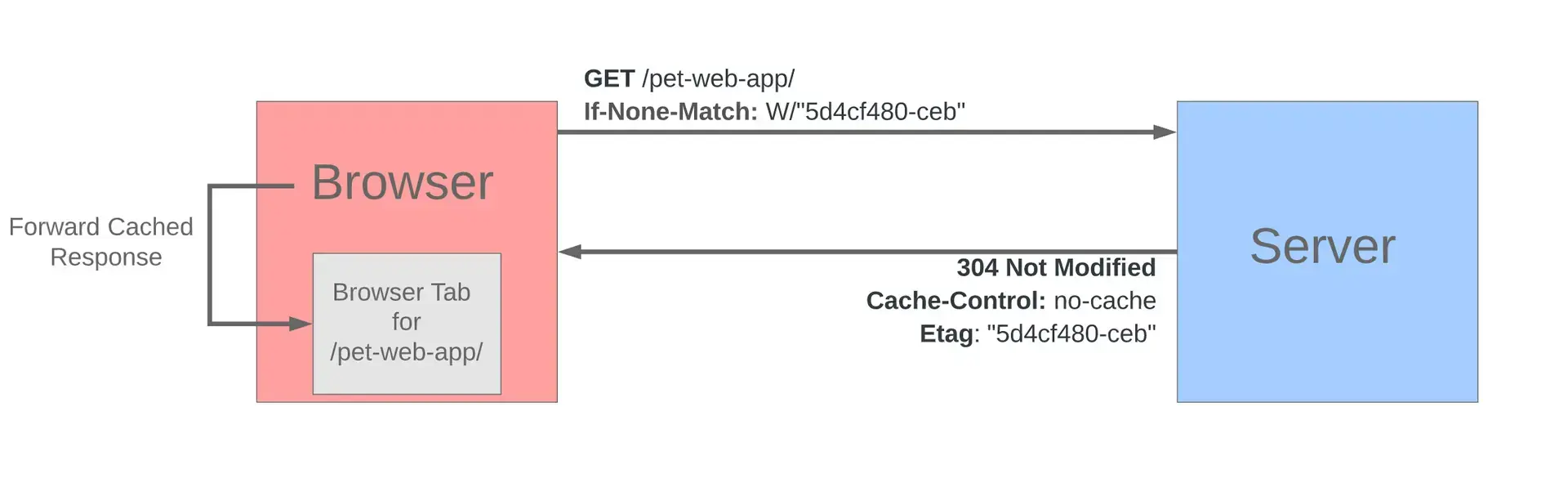
Cache Strategy by Content Type
# HTML pages
Cache-Control: public, max-age=0, must-revalidate

# API responses
Cache-Control: private, no-cache

# Static assets (CSS, JS, images with hash in filename)
Cache-Control: public, max-age=31536000, immutable

# User-specific data
Cache-Control: private, max-age=300

# Sensitive data
Cache-Control: private, no-storeContent Negotiation
Client and server agree on format/language.
Accept Header
GET /api/users
Accept: application/json

Response:
Content-Type: application/json
{"users":[...]}GET /page
Accept: text/html
Response:
Content-Type: text/html
<html>...</html>Accept-Language
Accept-Language: es-MX, es;q=0.9, en;q=0.8Translation: "I prefer Mexican Spanish, any Spanish is fine, English as backup"
Quality Values (q)
Accept: application/json, application/xml;q=0.9, */*;q=0.8q=1.0(default): Preferredq=0.9: Less preferredq=0.8: Least preferred
Compression
Compression reduces payload size significantly.
Accept-Encoding
GET /api/data
Accept-Encoding: gzip, br

Response:
Content-Encoding: gzip
[compressed data]Compression Algorithms
gzip (universal support)
Content-Encoding: gzipBrotli (better compression, modern browsers)
Content-Encoding: brReal Impact
Original: 1.2 MB
Gzipped:  300 KB
Savings:  75%
Always compress: Text, JSON, HTML, CSS, JavaScript
Don't compress: Images (already compressed), videos
Persistent Connections
Keep connections open for multiple requests.
HTTP/1.1 Keep-Alive
Connection: keep-alive┌─────────────────────────────────┐
│ Connect once │
│ Request 1 → Response 1 │
│ Request 2 → Response 2 │
│ Request 3 → Response 3 │
│ Disconnect │
└─────────────────────────────────┘
vs Old way:
Connect → Request 1 → Response 1 → Disconnect
Connect → Request 2 → Response 2 → Disconnect
Connect → Request 3 → Response 3 → Disconnect
Benefit: Eliminates TCP handshake overhead (50-100ms per connection)
HTTP/2 & HTTP/3
Persistent connections built-in. No special headers needed.
Streaming
Send data without knowing total size.
Chunked Transfer Encoding
Transfer-Encoding: chunked

1a\r\n
This is the first chunk\r\n
14\r\n
This is the second\r\n
0\r\n
\r\nEach chunk: size in hex + \r\n + data + \r\n
Last chunk: 0\r\n\r\n
Real-World Uses
Streaming API responses:
// Server-sent events
res.setHeader('Content-Type', 'text/event-stream');
res.setHeader('Transfer-Encoding', 'chunked');

setInterval(() => {
  res.write(`data: ${JSON.stringify({time: Date.now()})}\n\n`);
}, 1000);Streaming logs:
curl https://api.example.com/logs/stream
# Receives log lines as they're generatedVideo streaming: Sends chunks as they're encoded/available
HTTPS
HTTPS = HTTP + TLS encryption
Why HTTPS?
Without HTTPS:
You → "password123" → [Anyone listening] → Server
With HTTPS:
You → [encrypted gibberish] → Server
Even if intercepted, data is unreadable.
What HTTPS Provides
- Encryption: Data can't be read
- Authentication: Server is who they claim
- Integrity: Data can't be modified
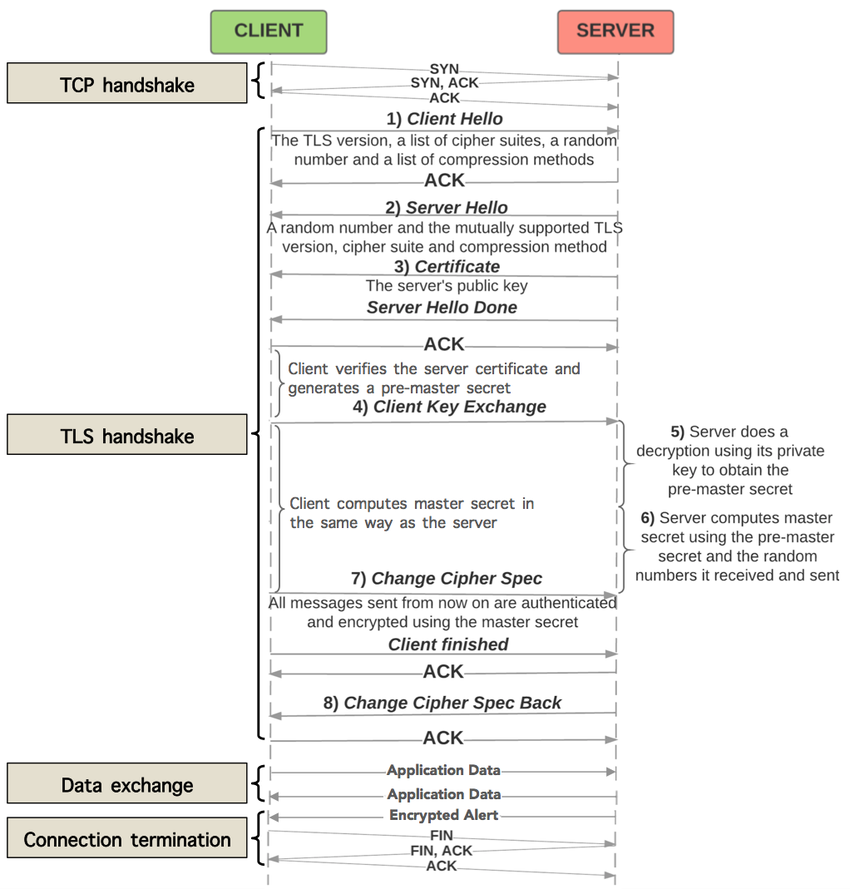
TLS Handshake (Simplified)
Client → Server: "Let's use HTTPS"
Server → Client: "Here's my certificate"
Client verifies certificate
Client → Server: [Encrypted session key]
Both use session key for encryption
Certificate Verification
Browser checks:
- Certificate not expired?
- Issued by trusted CA?
- Domain matches?
- Not revoked?
If all pass: 🔒 Green lock
If fail: ⚠️ Security warning
HTTP → HTTPS Upgrade
Force HTTPS:
HTTP/1.1 301 Moved Permanently
Location: https://example.com
Strict-Transport-Security: max-age=31536000HSTS (HTTP Strict Transport Security):
Strict-Transport-Security: max-age=31536000; includeSubDomainsBrowser automatically uses HTTPS for all requests to this domain.
Debugging HTTP
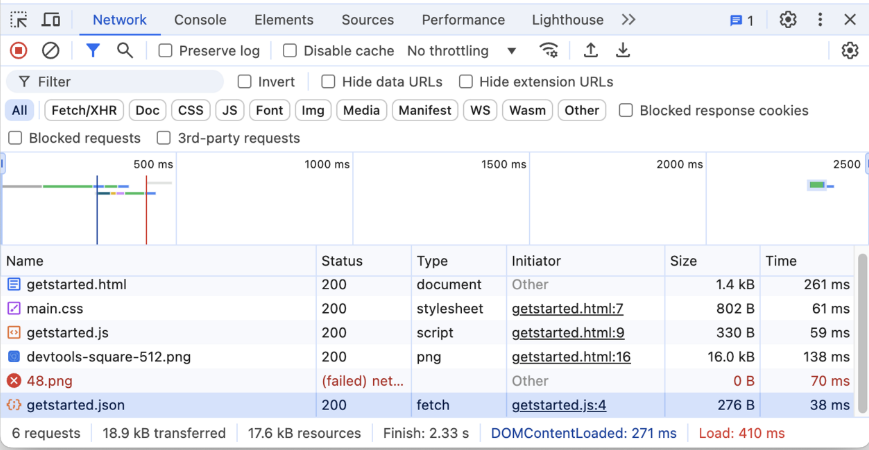
Browser DevTools
F12 → Network Tab
Shows:
- All requests/responses
- Headers
- Timing
- Payload size
cURL (Command Line)
# Basic request
curl https://api.example.com/users

# Show headers
curl -v https://api.example.com/users

# POST with data
curl -X POST https://api.example.com/users \
  -H "Content-Type: application/json" \
  -d '{"name":"Alice"}'

# Follow redirects
curl -L https://example.com

# Save response
curl -o output.json https://api.example.com/dataCommon Issues
CORS errors:
Check: Access-Control-Allow-Origin header
Fix: Add header on server
401 Unauthorized:
Check: Authorization header present and valid
Fix: Include valid token
304 Not Modified confusion:
Remember: 304 means use cached version (not an error!)
Unexpected status codes:
Check: What server is actually returning
Use: curl -v to see full response
Quick Reference
Essential Headers Cheat Sheet
Request:
Host: api.example.com              (required)
Authorization: Bearer <token>       (auth)
Content-Type: application/json      (body format)
Accept: application/json (wanted format)Response:
Content-Type: application/json      (body format)
Cache-Control: max-age=3600         (caching)
Access-Control-Allow-Origin: * (CORS)Security:
Strict-Transport-Security: max-age=31536000
Content-Security-Policy: default-src 'self'
X-Content-Type-Options: nosniff
X-Frame-Options: DENYBest Practices Summary
API Design
- Use appropriate HTTP methods
- Return meaningful status codes
- Include proper headers (Content-Type, etc.)
- Implement caching where appropriate
- Version your API (URL or header)
Security
- Always use HTTPS in production
- Set security headers (HSTS, CSP, etc.)
- Use HttpOnly, Secure cookies
- Implement rate limiting
- Validate all inputs
Performance
- Enable compression (gzip/brotli)
- Use appropriate caching headers
- Leverage HTTP/2 if available
- Minimize payload size
- Use persistent connections
Debugging
- Check Network tab first
- Use curl for API testing
- Include request IDs for tracing
- Log headers in development
- Test with real network conditions
Remember: HTTP is simple at its core—requests and responses with headers and bodies. Everything else is optimization and security built on top of that foundation.
Master these fundamentals, and you'll understand what's happening in any HTTP-based system.
The End
Thank you for reading. Hope you don't need anything else to learn http.